Tutorial for fine-tuning ChromBERT
Welcome to our tutorial on fine-tuning ChromBERT! In this guide, we’ll walk you through the step-by-step process of fine-tuning and modeling CTCF peaks (ENCFF664UGR).
Please note: This tutorial serves as a simple demonstration. For comprehensive guidance and productive usage, please refer to our compiled scripts: Tutorials.
[1]:
import os
os.environ["CUDA_VISIBLE_DEVICES"] = "0" # set the GPU to use
os.environ["PROTOCOL_BUFFERS_PYTHON_IMPLEMENTATION"] = "python" # for compatibility of tensorboard

import torch
import pathlib

import chrombert
from tqdm import tqdm
import numpy as np
import pandas as pd
from umap import UMAP

import seaborn as sns
from matplotlib import pyplot as plt

from torchinfo import summary

basedir = os.path.expanduser("~/.cache/chrombert/data")
/home/yangdongxu/.local/lib/python3.10/site-packages/pandas/core/arrays/masked.py:60: UserWarning: Pandas requires version '1.3.6' or newer of 'bottleneck' (version '1.3.5' currently installed).
  from pandas.core import (
Dataset Preparation
This section provides a step-by-step guide to preparing your dataset for fine-tuning ChromBERT.
Steps to Prepare the Dataset
- Define Regions and LabelsIdentify the genomic regions and their corresponding labels that will serve as input for fine-tuning. Ensure that these regions represent the data you aim to model effectively.
- Align to Human-Cistrome-6kAlign your genomic regions to the Human-Cistrome-6k dataset using genomic coordinates. This alignment ensures consistency and accuracy across your dataset.
- Configure the DatasetCreate a configuration file to define the specifics of your dataset. This file should include paths to the data, label definitions, and any relevant parameters needed for processing.
- Generate the Dataset ObjectUse the configuration file to generate a dataset object. This object serves as a structured input for the fine-tuning process.
By following these steps, you’ll have a well-prepared dataset ready to be used for fine-tuning ChromBERT effectively.
[2]:
# Align the genomic coordinates with the Human-Cistrome-6k dataset
from chrombert.scripts.chrombert_make_dataset import get_overlap

df_supervised = get_overlap(
    supervised = os.path.join(basedir, "demo", "embedding","CTCF_ENCFF664UGR.bed"), # a narrowPeak file
    regions = os.path.join(basedir, "config", "hg38_6k_1kb_region.bed"),
    no_filter = True,
).assign(label = lambda df: df["label"] > 0 )
df_supervised
[2]:
| chrom | start | end | build_region_index | label | |
|---|---|---|---|---|---|
| 0 | chr1 | 10000 | 11000 | 0 | False |
| 1 | chr1 | 16000 | 17000 | 1 | False |
| 2 | chr1 | 17000 | 18000 | 2 | False |
| 3 | chr1 | 29000 | 30000 | 3 | False |
| 4 | chr1 | 30000 | 31000 | 4 | False |
| ... | ... | ... | ... | ... | ... |
| 2137889 | chrY | 26671000 | 26672000 | 2137889 | False |
| 2137890 | chrY | 56674000 | 56675000 | 2137890 | False |
| 2137891 | chrY | 56678000 | 56679000 | 2137891 | False |
| 2137892 | chrY | 56684000 | 56685000 | 2137892 | False |
| 2137893 | chrY | 56685000 | 56686000 | 2137893 | False |
2137894 rows × 5 columns
Since this is a simple demonstration, we will use only chr21 for training and chr22 for evaluation.
[3]:
from sklearn.model_selection import train_test_split
df_supervised = df_supervised.groupby("label").sample(50000, random_state=42) # downsample to generate a balanced dataset. For real applications, you may want to use the full dataset.
df_chr21 = df_supervised.query("chrom == 'chr21'").reset_index(drop=True)
df_train, df_valid = train_test_split(df_chr21, test_size=0.2, random_state=42)
df_test = df_supervised.query("chrom == 'chr22'").reset_index(drop=True)

odir = pathlib.Path("tmp_ft")
odir.mkdir(exist_ok=True)
df_train.to_csv(odir/"train.csv", index=False)
df_valid.to_csv(odir/"valid.csv", index=False)
df_test.to_csv(odir/"test.csv", index=False)
len(df_train), len(df_valid), len(df_test)
[3]:
(889, 223, 1922)
We provide the chrombert.get_preset_dataset_config interface to streamline the creation of your dataset configuration. This function offers a quick and convenient way to set up your dataset for fine-tuning.
For advanced use cases, you can leverage the chrombert.DatasetConfig class to create a custom dataset configuration. This approach gives you greater flexibility and allows for tailored adjustments to meet your specific needs.
[4]:
# Configure the dataset
dc = chrombert.get_preset_dataset_config(
    "general",
    supervised_file = str(odir/"train.csv"), # convert to str dtype
    batch_size=4
    )
# Instantiate the dataset from config
ds = dc.init_dataset()
ds[1]
update path: hdf5_file = hg38_6k_1kb.hdf5
update path: meta_file = config/hg38_6k_meta.json
[4]:
{'input_ids': tensor([8, 6, 8,  ..., 9, 6, 6], dtype=torch.int8),
 'position_ids': tensor([   1,    2,    3,  ..., 6389, 6390, 6391]),
 'region': tensor([      21, 39126000, 39127000], dtype=torch.int32),
 'build_region_index': 1169028,
 'label': True}
We use PyTorch Lightning to make the model training process easier. The dataset is wrapped in a lightning.pytorch.core.LightningDataModule, which provides a clear and organized way to handle data loading and preprocessing, making the training workflow more manageable.
[5]:
data_module = chrombert.LitChromBERTFTDataModule(
    config = dc,
    train_params = dict(supervised_file = str(odir/"train.csv")),
    val_params = dict(supervised_file = str(odir/"valid.csv")),
    test_params = dict(supervised_file = str(odir/"test.csv")),
)
data_module
[5]:
<chrombert.finetune.dataset.data_module.LitChromBERTFTDataModule at 0x7f8161fa2bc0>
Model Configuration
To make it easier to set up your model configuration, we offer the chrombert.get_preset_model_config interface. This function lets you quickly create a model configuration for fine-tuning ChromBERT.
If you need more customization, you can use the chrombert.ChromBERTFTConfig class to create your own model configuration. This gives you the flexibility to adjust the model parameters to meet your specific requirements and goals.
[6]:
mc = chrombert.get_preset_model_config("general")
print(mc)
update path: mtx_mask = config/hg38_6k_mask_matrix.tsv
update path: pretrain_ckpt = checkpoint/hg38_6k_1kb_pretrain.ckpt
{
    "genome": "hg38",
    "task": "general",
    "dim_output": 1,
    "mtx_mask": "/home/yangdongxu/.cache/chrombert/data/config/hg38_6k_mask_matrix.tsv",
    "dropout": 0.1,
    "pretrain_ckpt": "/home/yangdongxu/.cache/chrombert/data/checkpoint/hg38_6k_1kb_pretrain.ckpt",
    "finetune_ckpt": null,
    "ignore": false,
    "ignore_index": [
        null,
        null
    ],
    "gep_flank_window": 4,
    "gep_parallel_embedding": false,
    "gep_gradient_checkpoint": false,
    "gep_zero_inflation": false,
    "prompt_kind": "cistrome",
    "prompt_dim_external": 512,
    "dnabert2_ckpt": null
}
[7]:
# Instantiate the model from config
model = mc.init_model()
model
use organisim hg38; max sequence length is 6391
[7]:
ChromBERTGeneral(
  (pretrain_model): ChromBERT(
    (embedding): BERTEmbedding(
      (token): TokenEmbedding(10, 768, padding_idx=0)
      (position): PositionalEmbedding(
        (pe): PositionalEmbeddingTrainable(
          (pe): Embedding(6392, 768)
        )
      )
      (dropout): Dropout(p=0.1, inplace=False)
    )
    (transformer_blocks): ModuleList(
      (0-7): 8 x EncoderTransformerBlock(
        (attention): SelfAttentionFlashMHA(
          (Wqkv): Linear(in_features=768, out_features=2304, bias=True)
        )
        (feed_forward): PositionwiseFeedForward(
          (w_1): Linear(in_features=768, out_features=3072, bias=True)
          (w_2): Linear(in_features=3072, out_features=768, bias=True)
          (dropout): Dropout(p=0.1, inplace=False)
          (activation): GELU()
        )
        (input_sublayer): SublayerConnection(
          (norm): LayerNorm()
          (dropout): Dropout(p=0.1, inplace=False)
        )
        (output_sublayer): SublayerConnection(
          (norm): LayerNorm()
          (dropout): Dropout(p=0.1, inplace=False)
        )
        (dropout): Dropout(p=0.1, inplace=False)
      )
    )
  )
  (ft_header): GeneralHeader(
    (interface): CistromeEmbeddingManager()
    (conv): Conv2d(1, 1, kernel_size=(1, 768), stride=(1, 1))
    (activation): ReLU()
    (res1): ResidualBlock(
      (fc1): Linear(in_features=1073, out_features=1024, bias=True)
      (fc2): Linear(in_features=1024, out_features=1024, bias=True)
      (norm): LayerNorm()
      (shortcut): Linear(in_features=1073, out_features=1024, bias=True)
      (dropout): Dropout(p=0.1, inplace=False)
    )
    (res2): ResidualBlock(
      (fc1): Linear(in_features=1024, out_features=768, bias=True)
      (fc2): Linear(in_features=768, out_features=768, bias=True)
      (norm): LayerNorm()
      (shortcut): Linear(in_features=1024, out_features=768, bias=True)
      (dropout): Dropout(p=0.1, inplace=False)
    )
    (res3): ResidualBlock(
      (fc1): Linear(in_features=768, out_features=256, bias=True)
      (fc2): Linear(in_features=256, out_features=256, bias=True)
      (norm): LayerNorm()
      (shortcut): Linear(in_features=768, out_features=256, bias=True)
      (dropout): Dropout(p=0.1, inplace=False)
    )
    (fc): Linear(in_features=256, out_features=1, bias=True)
  )
)
Fine-Tuning
We use PyTorch Lightning to train the model, offering a simple and user-friendly interface for setting up the training loop. This approach makes it easy to manage and customize various aspects of model training, such as callbacks, logging, and checkpointing. Additionally, you can implement custom training logic if needed.
[8]:
tc = chrombert.finetune.TrainConfig(
    kind = "classification", # "classification", or "regression"
    loss = "bce", # specify "bce" to use Binary Cross-Entropy (BCE) loss. Use "focal" to apply Focal Loss instead.
    max_epochs=3,
    val_check_interval=0.2,
    )
# prepare pytorch lightning trainer
trainer = tc.init_trainer(
    precision = "bf16-mixed", # use bfloat16 to speed up training
    save_top_k = 3 # save the top 3 models. metrics can be set by `checkpoint_metric` and `checkpoint_mode`
    )
print(tc)
Using bfloat16 Automatic Mixed Precision (AMP)
GPU available: True (cuda), used: True
TPU available: False, using: 0 TPU cores
IPU available: False, using: 0 IPUs
HPU available: False, using: 0 HPUs
{
    "kind": "classification",
    "loss": "bce",
    "tag": "default",
    "adam_beta1": 0.9,
    "adam_beta2": 0.999,
    "weight_decay": 0.01,
    "lr": 0.0001,
    "warmup_ratio": 0.1,
    "max_epochs": 3,
    "accumulate_grad_batches": 1,
    "limit_val_batches": 64,
    "val_check_interval": 0.2,
    "checkpoint_metric": "bce",
    "checkpoint_mode": "min"
}
[9]:
pl_module = tc.init_pl_module(model) # wrap the model into a pytorch lightning module
summary(pl_module)
[9]:
=====================================================================================
Layer (type:depth-idx)                                       Param #
=====================================================================================
ClassificationPLModule                                       --
├─ChromBERTGeneral: 1-1                                      --
│    └─ChromBERT: 2-1                                        --
│    │    └─BERTEmbedding: 3-1                               4,916,736
│    │    └─ModuleList: 3-2                                  51,978,240
│    └─GeneralHeader: 2-2                                    --
│    │    └─CistromeEmbeddingManager: 3-3                    --
│    │    └─Conv2d: 3-4                                      769
│    │    └─ReLU: 3-5                                        --
│    │    └─ResidualBlock: 3-6                               3,251,200
│    │    └─ResidualBlock: 3-7                               2,166,528
│    │    └─ResidualBlock: 3-8                               460,032
│    │    └─Linear: 3-9                                      257
=====================================================================================
Total params: 62,773,762
Trainable params: 62,773,762
Non-trainable params: 0
=====================================================================================
[10]:
trainer.fit(pl_module, data_module) # start training, it takes nearly 10 minutes on a single A100 GPU
You are using a CUDA device ('NVIDIA A100-PCIE-40GB') that has Tensor Cores. To properly utilize them, you should set `torch.set_float32_matmul_precision('medium' | 'high')` which will trade-off precision for performance. For more details, read https://pytorch.org/docs/stable/generated/torch.set_float32_matmul_precision.html#torch.set_float32_matmul_precision
Missing logger folder: /home/yangdongxu/work/source/repos/ChromBERT/examples/tutorials/lightning_logs/chrombert-ft
LOCAL_RANK: 0 - CUDA_VISIBLE_DEVICES: [0]
Loading `train_dataloader` to estimate number of stepping batches.

  | Name  | Type             | Params
-------------------------------------------
0 | model | ChromBERTGeneral | 62.8 M
-------------------------------------------
62.8 M    Trainable params
0         Non-trainable params
62.8 M    Total params
251.095   Total estimated model params size (MB)
/miniconda/lib/python3.10/site-packages/lightning/pytorch/trainer/connectors/data_connector.py:480: PossibleUserWarning: Your `val_dataloader`'s sampler has shuffling enabled, it is strongly recommended that you turn shuffling off for val/test dataloaders.
  rank_zero_warn(
Epoch 0, global step 44: 'default_validation/bce' reached 0.39191 (best 0.39191), saving model to '/home/yangdongxu/work/source/repos/ChromBERT/examples/tutorials/lightning_logs/chrombert-ft/version_0/checkpoints/epoch=0-step=44.ckpt' as top 3
Epoch 0, global step 88: 'default_validation/bce' reached 0.22644 (best 0.22644), saving model to '/home/yangdongxu/work/source/repos/ChromBERT/examples/tutorials/lightning_logs/chrombert-ft/version_0/checkpoints/epoch=0-step=88.ckpt' as top 3
Epoch 0, global step 132: 'default_validation/bce' reached 0.23878 (best 0.22644), saving model to '/home/yangdongxu/work/source/repos/ChromBERT/examples/tutorials/lightning_logs/chrombert-ft/version_0/checkpoints/epoch=0-step=132.ckpt' as top 3
Epoch 0, global step 176: 'default_validation/bce' reached 0.22657 (best 0.22644), saving model to '/home/yangdongxu/work/source/repos/ChromBERT/examples/tutorials/lightning_logs/chrombert-ft/version_0/checkpoints/epoch=0-step=176.ckpt' as top 3
Epoch 0, global step 220: 'default_validation/bce' was not in top 3
Epoch 1, global step 267: 'default_validation/bce' was not in top 3
Epoch 1, global step 311: 'default_validation/bce' reached 0.18574 (best 0.18574), saving model to '/home/yangdongxu/work/source/repos/ChromBERT/examples/tutorials/lightning_logs/chrombert-ft/version_0/checkpoints/epoch=1-step=311.ckpt' as top 3
Epoch 1, global step 355: 'default_validation/bce' was not in top 3
Epoch 1, global step 399: 'default_validation/bce' reached 0.17877 (best 0.17877), saving model to '/home/yangdongxu/work/source/repos/ChromBERT/examples/tutorials/lightning_logs/chrombert-ft/version_0/checkpoints/epoch=1-step=399.ckpt' as top 3
Epoch 1, global step 443: 'default_validation/bce' was not in top 3
Epoch 2, global step 490: 'default_validation/bce' reached 0.18931 (best 0.17877), saving model to '/home/yangdongxu/work/source/repos/ChromBERT/examples/tutorials/lightning_logs/chrombert-ft/version_0/checkpoints/epoch=2-step=490.ckpt' as top 3
Epoch 2, global step 534: 'default_validation/bce' was not in top 3
Epoch 2, global step 578: 'default_validation/bce' reached 0.18359 (best 0.17877), saving model to '/home/yangdongxu/work/source/repos/ChromBERT/examples/tutorials/lightning_logs/chrombert-ft/version_0/checkpoints/epoch=2-step=578.ckpt' as top 3
Epoch 2, global step 622: 'default_validation/bce' reached 0.18464 (best 0.17877), saving model to '/home/yangdongxu/work/source/repos/ChromBERT/examples/tutorials/lightning_logs/chrombert-ft/version_0/checkpoints/epoch=2-step=622.ckpt' as top 3
Epoch 2, global step 666: 'default_validation/bce' reached 0.17034 (best 0.17034), saving model to '/home/yangdongxu/work/source/repos/ChromBERT/examples/tutorials/lightning_logs/chrombert-ft/version_0/checkpoints/epoch=2-step=666.ckpt' as top 3
`Trainer.fit` stopped: `max_epochs=3` reached.
Checkpoints will be saved in lightning_logs/chrombert-ft by default.
[11]:
path = pathlib.Path("lightning_logs/chrombert-ft")
for p in path.rglob("*ckpt"):
    if "last.ckpt" in str(p):
        path_last_ckpt = p
    print(p)
lightning_logs/chrombert-ft/version_0/checkpoints/last.ckpt
lightning_logs/chrombert-ft/version_0/checkpoints/epoch=1-step=399.ckpt
lightning_logs/chrombert-ft/version_0/checkpoints/epoch=2-step=578.ckpt
lightning_logs/chrombert-ft/version_0/checkpoints/epoch=2-step=666.ckpt
Evaluation
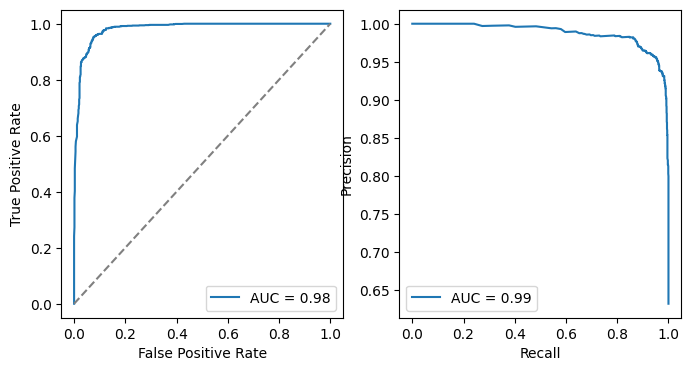
In this section, we will evaluate the performance of the fine-tuned model. This evaluation is crucial for understanding how well the model has learned from the training data and how effectively it can predict CTCF peaks on unseen data.
[12]:
# load test dataset
dc = chrombert.get_preset_dataset_config(
    "general",
    supervised_file = str(odir/"test.csv"), # convert to str dtype
    batch_size=4
    )
ds = dc.init_dataset()
ds[1]
update path: hdf5_file = hg38_6k_1kb.hdf5
update path: meta_file = config/hg38_6k_meta.json
[12]:
{'input_ids': tensor([5, 5, 5,  ..., 6, 5, 5], dtype=torch.int8),
 'position_ids': tensor([   1,    2,    3,  ..., 6389, 6390, 6391]),
 'region': tensor([      22, 32679000, 32680000], dtype=torch.int32),
 'build_region_index': 1189560,
 'label': False}
[13]:
# load model from checkpoint
mc = chrombert.get_preset_model_config(
    "general",
    finetune_ckpt = os.path.abspath(str(path_last_ckpt)), # setting checkpoint path, must use absolute path
    dropout = 0 # to avoid randomness
)
model = mc.init_model().cuda().bfloat16().eval()
summary(model)
update path: mtx_mask = config/hg38_6k_mask_matrix.tsv
update path: pretrain_ckpt = checkpoint/hg38_6k_1kb_pretrain.ckpt
update path: finetune_ckpt = /home/yangdongxu/work/source/repos/ChromBERT/examples/tutorials/lightning_logs/chrombert-ft/version_0/checkpoints/last.ckpt
use organisim hg38; max sequence length is 6391
Loading checkpoint from /home/yangdongxu/work/source/repos/ChromBERT/examples/tutorials/lightning_logs/chrombert-ft/version_0/checkpoints/last.ckpt
Loading from pl module, remove prefix 'model.'
Loaded 110/110 parameters
[13]:
================================================================================
Layer (type:depth-idx)                                  Param #
================================================================================
ChromBERTGeneral                                        --
├─ChromBERT: 1-1                                        --
│    └─BERTEmbedding: 2-1                               --
│    │    └─TokenEmbedding: 3-1                         7,680
│    │    └─PositionalEmbedding: 3-2                    4,909,056
│    │    └─Dropout: 3-3                                --
│    └─ModuleList: 2-2                                  --
│    │    └─EncoderTransformerBlock: 3-4                6,497,280
│    │    └─EncoderTransformerBlock: 3-5                6,497,280
│    │    └─EncoderTransformerBlock: 3-6                6,497,280
│    │    └─EncoderTransformerBlock: 3-7                6,497,280
│    │    └─EncoderTransformerBlock: 3-8                6,497,280
│    │    └─EncoderTransformerBlock: 3-9                6,497,280
│    │    └─EncoderTransformerBlock: 3-10               6,497,280
│    │    └─EncoderTransformerBlock: 3-11               6,497,280
├─GeneralHeader: 1-2                                    --
│    └─CistromeEmbeddingManager: 2-3                    --
│    └─Conv2d: 2-4                                      769
│    └─ReLU: 2-5                                        --
│    └─ResidualBlock: 2-6                               --
│    │    └─Linear: 3-12                                1,099,776
│    │    └─Linear: 3-13                                1,049,600
│    │    └─LayerNorm: 3-14                             2,048
│    │    └─Linear: 3-15                                1,099,776
│    │    └─Dropout: 3-16                               --
│    └─ResidualBlock: 2-7                               --
│    │    └─Linear: 3-17                                787,200
│    │    └─Linear: 3-18                                590,592
│    │    └─LayerNorm: 3-19                             1,536
│    │    └─Linear: 3-20                                787,200
│    │    └─Dropout: 3-21                               --
│    └─ResidualBlock: 2-8                               --
│    │    └─Linear: 3-22                                196,864
│    │    └─Linear: 3-23                                65,792
│    │    └─LayerNorm: 3-24                             512
│    │    └─Linear: 3-25                                196,864
│    │    └─Dropout: 3-26                               --
│    └─Linear: 2-9                                      257
================================================================================
Total params: 62,773,762
Trainable params: 62,773,762
Non-trainable params: 0
================================================================================
[14]:
# forward
list_logit = []
list_label = []
dl = dc.init_dataloader()
with torch.no_grad():
    for i, batch in tqdm(enumerate(dl), total = len(dl)):
        for k, v in batch.items():
            if isinstance(v, torch.Tensor):
                batch[k] = v.cuda()
        output = model(batch)
        list_logit.append(output.float().cpu().numpy()) # must convert to float before converting to cpu
        list_label.append(batch["label"].cpu().numpy())

list_logit = np.concatenate(list_logit, axis=0).reshape(-1)
list_label = np.concatenate(list_label, axis=0).reshape(-1)
df_prob = pd.DataFrame(
    dict(
        logit = list_logit,
        label = list_label
    )
)
def sigmoid(x):
    return 1 / (1 + np.exp(-x))

df_prob["prob"] = sigmoid(df_prob["logit"])
df_prob
100%|██████████| 481/481 [00:37<00:00, 12.72it/s]
[14]:
| logit | label | prob | |
|---|---|---|---|
| 0 | -5.437500 | False | 0.004332 |
| 1 | -5.875000 | False | 0.002801 |
| 2 | -5.218750 | False | 0.005385 |
| 3 | -4.406250 | False | 0.012054 |
| 4 | -4.781250 | False | 0.008316 |
| ... | ... | ... | ... |
| 1917 | 3.203125 | True | 0.960952 |
| 1918 | 1.867188 | True | 0.866133 |
| 1919 | 4.531250 | True | 0.989347 |
| 1920 | 4.718750 | True | 0.991153 |
| 1921 | 1.367188 | True | 0.796925 |
1922 rows × 3 columns
[15]:
from sklearn import metrics
# plot the ROC curve and PRC curve
fig, ax = plt.subplots(1, 2, figsize=(8, 4))
fpr, tpr, _ = metrics.roc_curve(df_prob["label"], df_prob["prob"])
ax[0].plot(fpr, tpr, label=f"AUC = {metrics.auc(fpr, tpr):.2f}")
ax[0].plot([0, 1], [0, 1], "--", color="gray")
ax[0].set_xlabel("False Positive Rate")
ax[0].set_ylabel("True Positive Rate")
ax[0].legend()
precision, recall, _ = metrics.precision_recall_curve(df_prob["label"], df_prob["prob"])
ax[1].plot(recall, precision, label=f"AUC = {metrics.auc(recall, precision):.2f}")
ax[1].set_xlabel("Recall")
ax[1].set_ylabel("Precision")
ax[1].legend()
plt.show()
Conclusion
Congratulations! You’ve reached the end of this tutorial. The steps covered here can be adapted to other tasks, as they follow a similar process. For more detailed guidance on specific tasks, please refer to the related tutorials provided.
Thank you for using ChromBERT! We appreciate your interest and hope this tool proves valuable for your research. If you have any questions or need further assistance, don’t hesitate to reach out.